

Compare GitHub Copilot Business and Windsurf Teams for 50+ developers, covering licensing, AI usage, productivity, security, integrations, and hidden costs.
Choosing an AI coding assistant for a development team is no longer just about which tool produces better code suggestions. Once an organization has 50 or more developers, licensing, AI usage limits, administration, security controls, IDE compatibility, and engineering workflows all affect the total cost of ownership (TCO).
GitHub Copilot Business and Windsurf Teams approach this problem differently. Copilot adds AI assistance to established development environments and benefits from its close integration with GitHub. Windsurf takes an AI-first editor approach, with its Cascade agent designed to work across files, understand project context, and execute development tasks.
The cheaper subscription is not necessarily the cheaper solution over a full year. This comparison examines the practical costs, operational differences, and organizational trade-offs engineering leaders should weigh before rolling out either platform to 50+ developers.
1. Why Engineering Teams Are Comparing Copilot and Windsurf
At smaller companies, developers often choose coding assistants based on personal preference. At 50+ developers, the decision becomes an engineering management problem.
A platform that works well for one developer might create administrative overhead when deployed across multiple teams. Engineering managers need to consider:
- Developer experience: Does the assistant fit existing IDEs and workflows?
- Repository understanding: Can it navigate multiple files and understand dependencies?
- AI consumption: Are included usage allowances sufficient for regular agent-based development?
- Administration: Can administrators manage seats, policies, and access centrally?
- Security: How are source code, prompts, credentials, and generated outputs handled?
- Migration costs: Will developers need to change editors, extensions, or established workflows?
Copilot is particularly attractive to organizations already using GitHub for repositories, pull requests, and project management. Windsurf appeals to teams interested in an AI-first editor and agent-driven development.
The right decision depends on how developers actually work, not just the number of features listed on a pricing page.
2. GitHub Copilot Business: Strengths and Limitations
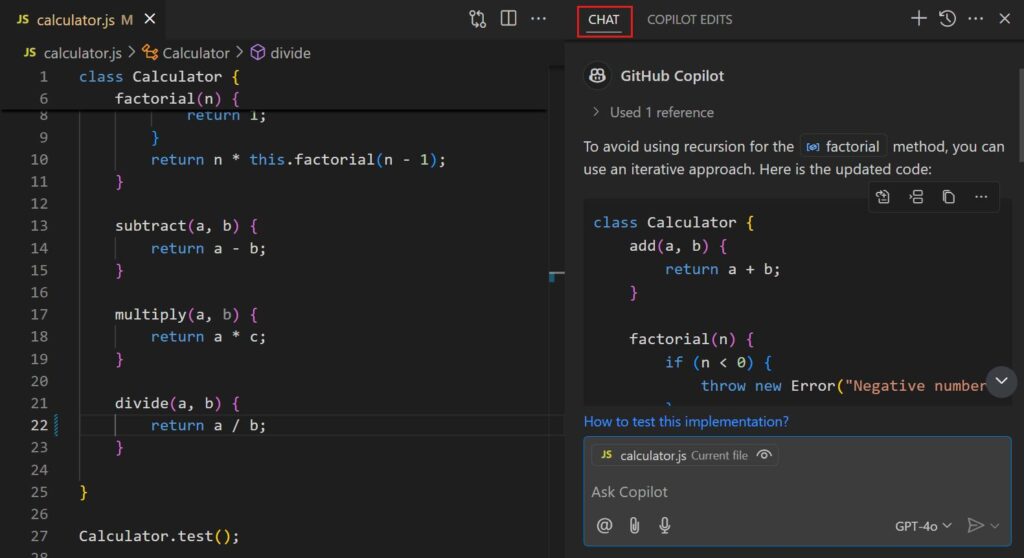
Best suited to organizations that want AI assistance inside their existing development environments.
GitHub Copilot Business integrates AI assistance into supported development environments, including Visual Studio Code, Visual Studio, JetBrains IDEs, and other supported editors.
Its main advantage is that developers do not necessarily need to replace their current IDE. A Python developer using VS Code and a Java developer using IntelliJ IDEA can work within familiar environments.
Practical development workflows
Copilot can help developers with:
- Generating functions, tests, and documentation.
- Explaining unfamiliar sections of a repository.
- Suggesting code while developers type.
- Refactoring existing implementations.
- Reviewing changes and identifying potential problems.
- Working with AI agents and supported MCP integrations.
For example, a developer maintaining a Node.js API could ask Copilot to generate unit tests for an existing service, explain its error-handling logic, and suggest improvements to validation.
However, generated tests still require human review. An AI assistant can produce tests that pass while failing to cover important business rules.
Licensing and usage model
Copilot Business uses a paid per-seat organizational subscription. Its included AI usage allowance is allocated per user, and additional usage can introduce consumption-based costs depending on the applicable billing configuration.
Administrators can manage access, policies, and available features centrally.
GitHub also offers Copilot Enterprise, which adds enterprise-focused capabilities, including deeper GitHub platform integration and organizational codebase knowledge features.
Check the official GitHub Copilot pricing page and documentation before purchasing because plan entitlements, usage allowances, and billing rules can change.
Advantages
- Works with existing supported IDEs.
- Strong GitHub ecosystem integration.
- Centralized organizational administration.
- Supports multiple AI models.
- Useful for autocomplete, chat, and agent workflows.
- Business customer data is not used to train GitHub’s models.
Limitations
- AI credit consumption needs monitoring.
- Agent results still require engineering review.
- Some advanced organizational features require higher-tier licensing.
- Developers working outside GitHub-centric workflows may not use its integrations as extensively.
3. Windsurf Teams: Strengths and Limitations
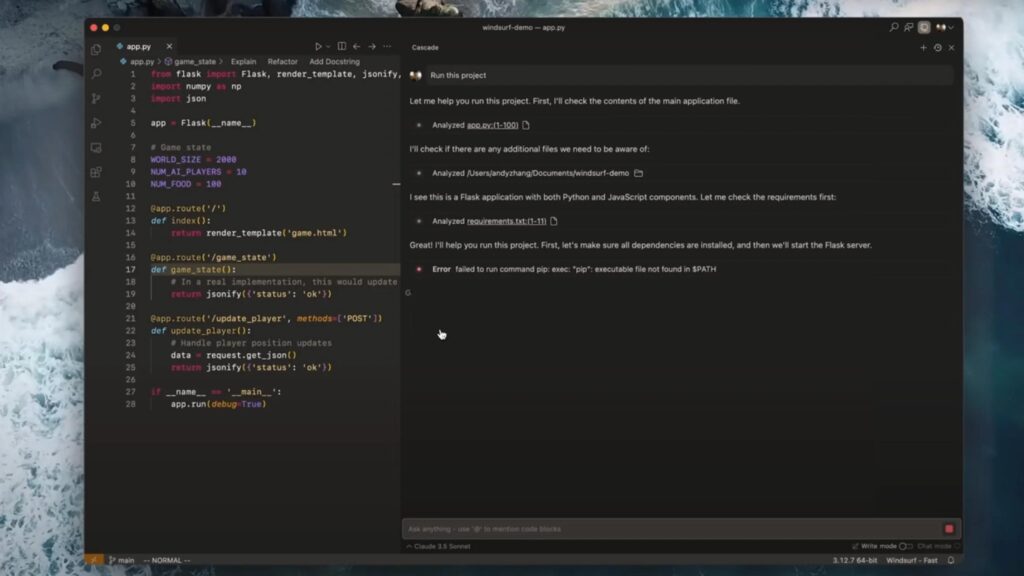
Best suited to teams interested in agent-oriented development and an AI-first editor experience.
Windsurf introduced a different approach to AI-assisted software development. Rather than operating primarily as an assistant added to an existing editor, it provides an AI-focused development environment.
Its central agent experience, Cascade, can work with repository files, understand development context, suggest changes, and execute supported terminal operations.
One important naming update: Windsurf’s editor is transitioning to the Devin Desktop brand. The company describes Devin Desktop as the new name for Windsurf, with the existing IDE experience continuing as part of the product. Organizations evaluating the platform should verify the current product name and contract terms.
Practical development workflows
Consider a team maintaining a React frontend and a Python backend.
A developer might ask Cascade to:
- Examine the existing authentication implementation.
- Identify the files involved in session management.
- Propose a migration plan.
- Update the relevant components.
- Run appropriate tests.
- Investigate failures and suggest corrections.
This workflow can reduce the manual effort involved in navigating unfamiliar code.
However, repository understanding is not the same as architectural correctness. Developers still need to verify database migrations, API contracts, authorization logic, and backward compatibility.
Licensing and usage model
Windsurf Teams uses a team subscription model with seat-based licensing and associated team-level charges under its published plan structure. Enterprise arrangements may include additional organizational requirements and negotiated terms.
Its billing structure should be evaluated alongside agent consumption, model availability, and any additional usage charges.
Review the official Windsurf pricing page for current subscription terms, regional taxes, seat definitions, and enterprise quotations.
Advantages
- Agent-focused development workflows.
- Contextual assistance across repository files.
- Integrated terminal interactions.
- Useful for multi-file changes and refactoring.
- MCP support for extending development workflows.
- An alternative to adding another AI extension to an existing IDE.
Limitations
- Moving to a different editor can create onboarding costs.
- Existing IDE extensions and team configurations need compatibility checks.
- Agent execution requires permissions and careful review.
- Heavy model usage can complicate budget forecasting.
- Teams need to evaluate GitHub workflows separately from basic Git connectivity.
4. GitHub Copilot vs. Windsurf: Technical Comparison
The biggest difference is not simply code-generation quality. It is how each product fits into the development lifecycle.
| Development environment | Existing supported IDEs | AI-first editor |
| Code completion | Yes | Yes |
| AI chat | Yes | Yes |
| Multi-file assistance | Yes | Agent-oriented workflows |
| Terminal workflows | Supported agent capabilities | Integrated Cascade workflows |
| GitHub connectivity | Native GitHub ecosystem integration | Git-based repository connectivity and integrations |
| MCP | Supported | Supported |
| Team administration | Organizational policies and seat management | Team administration and applicable controls |
| Licensing | Paid per-seat subscription | Team subscription and seat-based charges |
| Best fit | Existing GitHub-centric engineering teams | Teams adopting agent-first development |
Neither platform eliminates code review, CI/CD validation, or security testing. Both should operate within the same engineering quality gates as manually written code.
GitHub Copilot vs Windsurf: Which handles large codebases better?
Large repositories introduce problems that simple autocomplete cannot solve.
A change to a shared authentication library, for example, may affect multiple services, test suites, and deployment configurations.
Windsurf’s agent-oriented approach can be attractive when developers regularly need repository exploration and coordinated multi-file changes.
Copilot is attractive when developers want AI assistance without changing their existing editor and repository workflow.
The best approach is to test both against the same internal engineering tasks. Measure whether each assistant finds the correct dependencies, respects project conventions, and produces maintainable changes.
5. Windsurf vs Copilot Pricing: Calculating TCO for 50+ Developers
Subscription pricing is only the starting point. For a larger engineering organization, the actual cost includes licensing, additional AI consumption, onboarding, administration, and the time developers spend reviewing generated changes.
What is the cost of GitHub Copilot Business?
GitHub Copilot Business follows a per-user subscription model. Organizations purchase and assign seats, with an included AI credit allowance and additional usage governed by GitHub’s billing policies.
The cost of a 50-person deployment therefore depends on the number of assigned seats, the selected plan, and any additional consumption.
How does Windsurf Teams pricing work?
Windsurf Teams uses a team-oriented subscription structure that combines organizational charges and seat-based licensing. Its overall cost depends on the number and type of seats, included agent usage, and any additional consumption.
Do not compare an individual Windsurf subscription against an organizational Copilot plan. That produces an incomplete comparison because organizational administration and governance are part of the purchase.
TCO components for a 50+ developer organization
| Base licensing | Per assigned user | Team subscription and seats |
| AI consumption | Included credits and additional usage | Included usage and applicable additional consumption |
| Administration | GitHub organizational controls | Team management capabilities |
| Onboarding | Generally lower for existing supported IDE users | Potential editor migration and training |
| Integration | Strong GitHub ecosystem | Git and supported integrations |
| Maintenance | Existing IDE configuration | Editor configuration and compatibility |
| Review overhead | Human review required | Human review required |
A practical TCO calculation
Use the following model:
\[ TCO_{annual} = L + A + O + M + R \]
Where:
- \(L\) = Annual licensing costs.
- \(A\) = Additional AI consumption.
- \(O\) = Onboarding and training.
- \(M\) = Administration and maintenance.
- \(R\) = Engineering review overhead.
For a team of 50 developers, calculate each component using actual vendor quotations and internal labor estimates.
For example, a team that already uses VS Code extensively may have relatively little Copilot onboarding work. The same organization may need to budget additional time for Windsurf editor adoption, extension compatibility testing, and developer training.
That does not automatically make Copilot cheaper. If Windsurf materially reduces repetitive repository exploration or multi-file implementation work, those benefits may offset some of its additional operational costs.
The important distinction is between subscription cost and cost per successfully delivered engineering change.
Which platform offers better value?
Copilot generally offers a straightforward purchasing proposition for organizations already standardized on GitHub and supported IDEs.
Windsurf may offer better operational value when developers frequently use agent-based workflows and benefit from its integrated editor experience.
Neither conclusion should be accepted without a controlled pilot.
6. GitHub Integration, MCP, and AI Model Compatibility
Integration requirements become important when teams already depend on automated development pipelines.
Windsurf GitHub integration
Windsurf can work with GitHub-hosted repositories through standard Git operations, including cloning, branching, committing, pushing, and pulling.
However, GitHub connectivity should not be confused with the full native GitHub platform experience.
Organizations should separately test:
- Private repository access.
- SSH and HTTPS authentication.
- Branch protection rules.
- Pull request workflows.
- GitHub Actions integration.
- Organization-level permissions.
- Enterprise repository access.
A working Git remote does not automatically grant access to every GitHub API feature.
Windsurf MCP and Copilot MCP support
Model Context Protocol (MCP) allows AI applications to connect with external tools and data sources through a standardized interface.
Both products support MCP-based workflows.
For example, an engineering team might connect an approved MCP server to internal documentation, issue tracking, or a development database.
This can help an assistant retrieve relevant information without developers manually copying context into every conversation.
However, MCP servers introduce additional security considerations. An incorrectly configured server may expose sensitive information or grant excessive permissions.
Use approved servers, restrict access, and avoid giving agents unrestricted production credentials.
GPT-5 Windsurf and Windsurf Gemini 3
Developers frequently search for GPT-5 Windsurf and Windsurf Gemini 3 because model selection can affect reasoning, code generation, and agent behavior.
The important point is that model availability is not necessarily permanent. Windsurf’s model catalog and access conditions can change, and access may depend on the subscription and usage policy.
Before selecting a model, verify its current availability in the product’s model selector and official documentation.
Evaluate models against actual engineering tasks rather than assuming that the newest model will always produce the best production code.
Useful evaluation tasks include:
- Debugging an existing API.
- Refactoring a shared service.
- Generating integration tests.
- Understanding a complex dependency chain.
- Updating a database schema safely.
GitHub Copilot also provides model selection and MCP capabilities, with availability governed by plan entitlements and administrative policies.
GitHub+1
7. Security, Privacy, and Operational Governance
AI coding assistants can process proprietary source code, internal documentation, application architecture, and potentially sensitive configuration data.
For organizations with 50+ developers, security reviews should happen before deployment.
Source code and training policies
GitHub states that Copilot Business and Enterprise customer data is not used to train its models. Its data retention practices also vary according to the feature and access method.
Organizations should review the relevant documentation rather than assuming every interaction follows identical retention rules.
For Windsurf, review the applicable enterprise agreement, data processing terms, retention settings, and zero-data-retention options where available.
Access control
A production rollout should include:
- Centralized account provisioning and deprovisioning.
- Role-based access controls.
- Approved model and MCP configurations.
- Restrictions on sensitive repositories.
- Audit and usage monitoring where supported.
- A documented process for handling security incidents.
Generated code security
Neither assistant should be trusted to approve its own output.
Maintain existing security controls, including:
- Automated dependency scanning.
- Static application security testing.
- Secret detection.
- Unit and integration tests.
- Mandatory pull request reviews.
- CI/CD validation.
For organizations subject to GDPR or other data protection requirements, review vendor data processing agreements, applicable processing locations, subprocessors, and retention policies.
The goal is to make AI assistance part of an existing secure development process, not a replacement for it.
8. Five Alternatives and Licensing Options Worth Considering
Although this comparison focuses on two team products, procurement teams should understand the surrounding licensing options.
| Copilot Business | Paid per seat | GitHub integration and team controls | Usage allowances | Established development teams |
| Copilot Enterprise | Enterprise per seat | Deeper GitHub integration and organizational context | Higher-tier licensing | Large GitHub organizations |
| Copilot Pro | Individual subscription | Personal AI coding assistance | No equivalent organizational seat management | Freelancers and individuals |
| Windsurf Teams | Team subscription and seats | Agent-focused editor workflows | Editor adoption and usage management | AI-first development teams |
| Windsurf Enterprise | Custom enterprise licensing | Enterprise deployment and governance options | Requires commercial evaluation | Larger regulated organizations |
| Copilot Free | Free tier | Basic AI coding assistance | Limited usage and organizational capabilities | Evaluation and personal use |
One important distinction: Copilot Pro is not a direct replacement for Copilot Business. Individual subscriptions do not provide the same organizational licensing, policy management, and business protections.
9. Is Windsurf Open Source?
No. Windsurf is a proprietary commercial development environment, not a fully open-source AI coding platform.
Its editor has historically been built on the VS Code foundation, but that does not make the Windsurf product, its AI agents, or its underlying services open source.
Organizations should distinguish between open-source editor foundations and proprietary commercial features.
This distinction matters when evaluating source availability, customization, software licensing, and long-term vendor dependency.
10. Is GitHub 100% Owned by Microsoft?
Yes. Microsoft completed its acquisition of GitHub in October 2018.
GitHub continues to operate as a developer platform within Microsoft’s corporate ownership. Its products and services are closely connected to Microsoft’s broader developer ecosystem.
For engineering teams, this ownership provides context when evaluating vendor relationships, platform dependencies, enterprise procurement, and long-term product strategy.
11. How to Choose: A Practical 30-Day Evaluation
Before purchasing licenses for 50 or more developers, run a controlled evaluation.
A useful approach is to select a representative group of developers from different engineering disciplines.
Include frontend engineers, backend developers, DevOps engineers, and senior architects.
Week 1: Establish a baseline
Record existing development workflows, typical task completion times, code review requirements, and current IDE configurations.
Week 2: Test both platforms
Assign comparable tasks to developers using Copilot Business and Windsurf Teams.
Use the same repositories, project instructions, and acceptance criteria.
Week 3: Evaluate production suitability
Examine generated code, test coverage, dependency changes, security findings, and developer corrections.
Pay particular attention to changes involving authentication, database migrations, and shared libraries.
Week 4: Calculate operational value
Compare licensing, AI consumption, onboarding time, administrative effort, and review overhead.
Do not rely exclusively on developer satisfaction surveys. A tool can feel faster while producing changes that require extensive corrections.
A successful evaluation should demonstrate improvements in delivered engineering work without weakening quality or security standards.

Frequently Asked Questions
1. What is the cost of GitHub Copilot Business?
GitHub Copilot Business uses paid per-user licensing. Each assigned seat includes an AI usage allowance, with additional consumption governed by GitHub’s billing policies. Check the official pricing page for current subscription and usage terms.
2. Is GitHub Copilot too expensive?
Not necessarily. Its value depends on developer adoption, AI consumption, and the engineering work it helps complete. For organizations already using GitHub, its existing integrations can reduce onboarding and administration overhead.
3. Is GitHub Copilot better than Windsurf?
Neither is universally better. Copilot is attractive for existing IDE workflows and GitHub integration. Windsurf is attractive for developers who prefer an AI-first editor and agent-oriented development.
4. Can Windsurf integrate with GitHub?
Yes. Windsurf supports Git-based workflows with GitHub repositories, including cloning, branching, committing, and pushing. However, organizations should independently verify required GitHub API, pull request, and enterprise integration capabilities.
5. Does Windsurf support GPT-5 and Gemini 3?
Model availability changes over time. Check Windsurf’s current model selector and official documentation to verify supported model versions, subscription eligibility, and usage conditions.
6. Is Copilot Pro suitable for a company with 50 developers?
Copilot Pro is designed for individual developers. Organizations requiring centralized seat assignment, policy controls, and business protections should evaluate Copilot Business or Enterprise instead.
7. What is the difference between Windsurf Teams and Copilot Business pricing?
Copilot Business uses organizational per-seat licensing with included AI credits. Windsurf Teams uses a team subscription and seat-based commercial structure. Additional AI consumption and administrative costs should also be considered when comparing annual ownership costs.
Sources & Reference Points
The following official documentation and technical references are useful for validating product capabilities and commercial terms:
- GitHub Copilot Plans and Pricing Documentation.
- GitHub Copilot Business Documentation.
- GitHub Copilot Enterprise Documentation.
- GitHub Copilot Usage-Based Billing Documentation.
- GitHub Copilot Models and Model Hosting Documentation.
- GitHub Copilot Security and Privacy Documentation.
- Windsurf Official Pricing Documentation.
- Windsurf Cascade Documentation.
- Windsurf Enterprise Documentation.
- Model Context Protocol Specification.
- Microsoft Official GitHub Acquisition Announcement.